

Updated Parking Permit Rates Effective July 1, 2025 – click here for more info!

PARKING PERMITS
Create an account to purchase a permit.
EMPLOYEE PERMIT
Create an account to purchase permit.
| PERMIT TYPE | COST | DESCRIPTION |
| Alvarado Street Permit | $20/ Month | This permit allows parking in excess of time limits in the designated employee parking areas on Alvarado Street, between Davis Street and Antonio Street. |
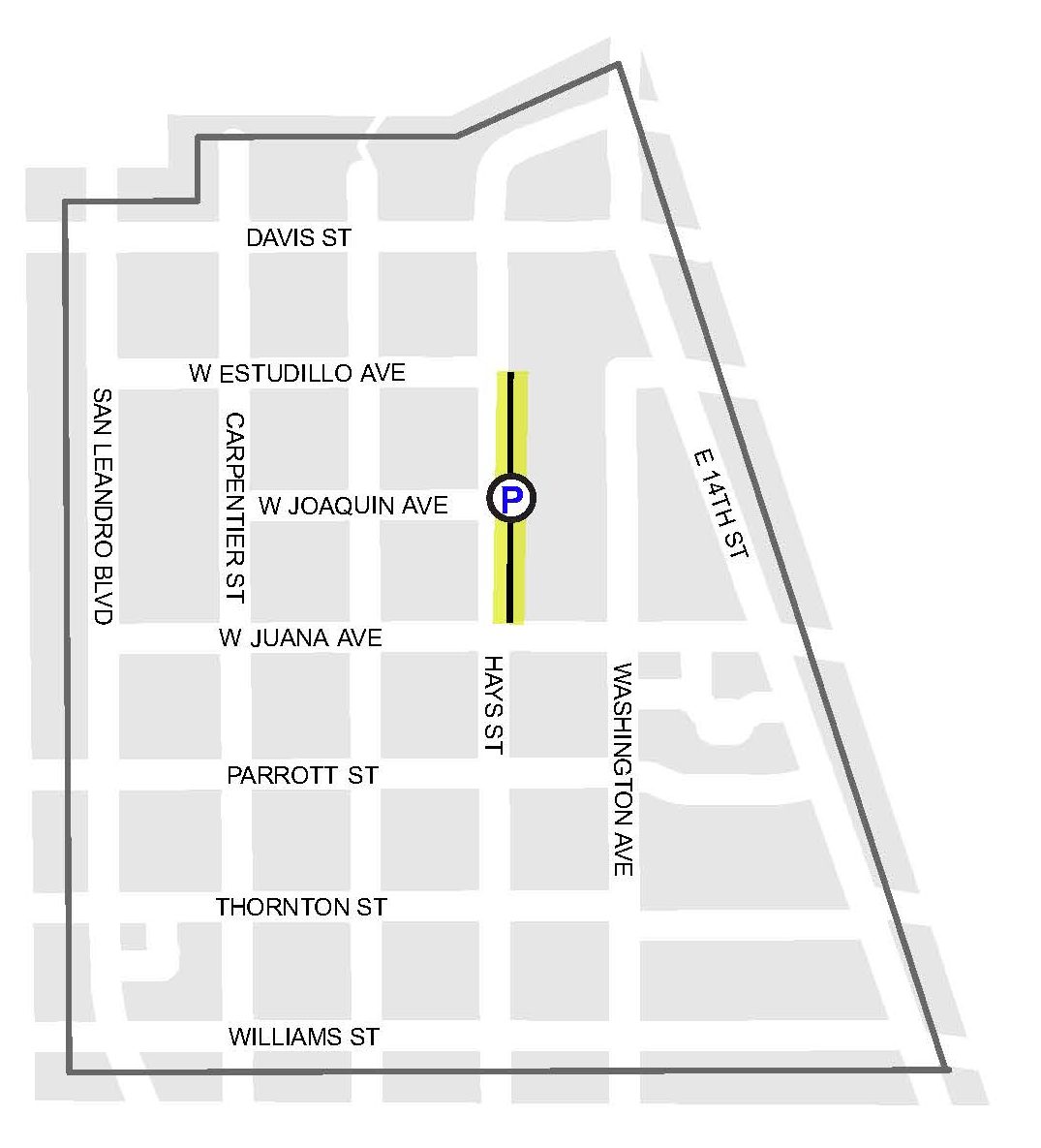
| Downtown Parking Permit | $45/ Month | This permit allows parking in the “Permit Only” spaces on the 2nd and 3rd floors of the Downtown Parking Garage and on the East side of Hays Street, between W. Juana Ave. and W. Estudillo Ave. |
| Low Income Downtown Employee Permit | $20/ Month | This permit is available ONLY to eligible employees of downtown businesses earning the California fast food wage (currently $20/hour) or less. This permit provides the same parking benefits in the same locations as the Downtown Parking Permit. |
| Overnight Parking – Downtown Garage | $80/ Month | This permit allows parking in the designated “Overnight Permit Parking Only” area overnight during restricted hours on the 3rd floor of the Downtown Parking Garage. Limitations may apply and availability is limited. |
| Reserved Parking – Downtown Garage | $960/ Year | Reserved parking provides the permit holder a dedicated space to park on the 2nd and 3rd floors of the Downtown Parking Garage. Reserved parking spaces may be marked with the name of the individual or business. Limitations may apply and availability is limited. |
| Safeway and Regency Employee Permit | $20/ Month | This permit is available ONLY to eligible employees of the Safeway in Washington Plaza and Regency Center businesses (see map below) for parking in the Washington Plaza Employee Lot behind Safeway (see map below), on the East side of Hays Street between W. Juana Ave and W. Estudillo Ave, or in the “Permit Only” spaces on the 2nd and 3rd floors of the Downtown Parking Garage. |
PERMIT TERMS AND CONDITIONS
All permit types are available on a first-come, first-served basis; permits do not guarantee a parking space unless otherwise specified. Only vehicles with current DMV registration are eligible for a parking permit; inoperable or abandoned vehicles are not eligible. Failure to observe the following terms and conditions may result in a parking citation:
- A parking permit must be purchased and registered as valid in the system before parking.
- Parking permits are valid only in the area for which they are issued, and only the active vehicle may park in the designated permit parking zone.
- Only one vehicle can be active per permit at a time; it is the permit holder’s responsibility to ensure the active vehicle matches the one parked in the zone.
- Parking is restricted in the Downtown Parking Garage daily from 2:00 a.m. to 4:00 a.m., except for vehicles with a valid Overnight Parking – Downtown Garage permit parked within the designated “Overnight Permit Parking Only” area.
- A valid Overnight Parking – Downtown Garage permit is required at all times to park in the designated “Overnight Permit Parking Only” area.
- Vehicle repair, vehicle washing, or sleeping in a vehicle is not permitted at any time in the Downtown Parking Garage.
Park at your own risk. The City of San Leandro is not responsible for damage or theft to vehicles or vehicle contents.
Click below to visit the permit registration portal or scroll down for more information and step-by-step instructions.
PERMIT PARKING MAPS
HAYS STREET
Permit Parking on East side between W Juana Ave. and W Estudillo Ave.
WASHINGTON PLAZA EMPLOYEE LOT
Permit Parking for employees of Safeway and Regency Center businesses

SAFEWAY AND REGENCY CENTER BUSINESSES

CREATE AN ACCOUNT TO PURCHASE
STEP ONE
STEP TWO:
Select Request a Permit.
STEP THREE:
Select a permit type from the drop down list and click Request Permit.
STEP FOUR:
Choose a permit renewal period, enter the required information, register up to two vehicles (per permit) and review and affirm the permit user acknowledgements.
STEP FIVE:
Click Add Permit to Shopping Cart and review the information on the next page.
When ready, click Save and Continue to proceed to payment.
OR:
Click Continue Shopping to add multiple permits to your shopping cart.
When ready, click Save and Continue to proceed to payment.
STEP SIX:
Enter your Credit/Debit Card Information and Card Holder Information, follow the instructions for setting up your user account, and then click Complete Purchase.
HOW DO I CREATE AN ACCOUNT?
The permit registration portal will provide on-screen instructions to register and purchase your parking permit or use link above to view the step-by-step instructions.
For additional assistance with permit registration or permit management, please call 1-800-479-1834.